----------------------------------------------------------------------
【Voltage Compatibility】
When using electrical appliances, please note that they are designed for Japanese voltage specifications (90-110V), so if you use them with a different voltage, it may cause a malfunction.
【Plug Type】
Our products use Japanese plug types (A or B type).
Please use a conversion adapter if necessary.
【Important Note on Transformers and Adapters】
A transformer adjusts voltage to match your device’s requirements.
A conversion adapter only changes the plug shape and does not adjust voltage.
Using only a conversion adapter without a transformer may result in damage to the product.
【Liability】
We are not responsible for malfunctions or damages caused by improper use, such as operating the product without a transformer.
----------------------------------------------------------------------
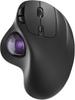
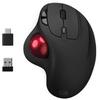
🖲️ [Trackball for Comfortable Cursor Control] Introducing the latest version of our popular wired trackball mouse! Its approximately 15° tilt and ergonomic shape allow you to grip the mouse at a natural wrist angle, significantly reducing wrist strain and reducing fatigue during extended computer work. Furthermore, since the trackball is operated with your thumb, there's no need to move the mouse, so it takes up less space and allows for comfortable cursor control even in limited spaces, such as on your lap or on a cluttered desk. (Note: This product is not suitable for small hands; it is best suited for medium to large hands. The length from the thin crease under the palm to the tip of the middle finger is at least 17.5 cm.)
🌈[Wide Compatibility] This wired mouse can be used immediately by simply plugging the cable into your computer's USB port. It supports two connection methods: USB-A receiver and Type-C receiver. It requires no batteries, so you can use it with peace of mind. This trackball mouse is compatible with computers, tablets, and smartphones equipped with USB Type-C or USB-A ports, including Windows XP, Windows 7, Windows 8, Windows 10 and later, Mac OS 10.10 and later, Android, Chrome OS, and Linux. (Note: This product cannot be connected to two devices simultaneously.)
🔇【Quiet Click】The left and right click buttons feature silent switches that eliminate the annoying clicking noise, reducing operation noise by over 90% compared to the previous model. This allows you to concentrate on your work or study without disturbing others, even in quiet places like the office, cafe, or library. (Note: The DPI change button and forward and back buttons are not silent.)
💠【4-Level DPI Adjustment】The high-performance sensor allows for precise cursor control. Simply press the DPI button on the top of the device to freely switch between four levels: 400, 800, 1200, and 1600 counts. Easily move back and forth from one edge of the screen to the other, and flexibly handle detailed tasks like creating tables. (Note: 1. This product is not suitable for highly delicate operations such as image editing. 2. Creating tables in Excel may take some time to get used to. 3. The default resolution is set to 400 dpi. If you find the cursor movement slow, try changing the cursor speed to 800, 1200, or 1600 dpi. If you find detailed operations difficult, try changing the cursor speed to 400 dpi.)
✨【Excellent Feel】The glossy finish and wide ball surface provide smooth movement and a soft feel. The inner layer is coated with a high-density particle coating for precise and smooth tracking.
💎 [Easy to Use] This wired trackball combines stylish design with superior operability. The ergonomic, elegantly curved design provides a comfortable grip and excellent operability. Furthermore, the "forward" and "back" buttons improve web browsing efficiency, making it easy to operate and significantly improving work efficiency! Its simple and user-friendly design makes it ideal for beginners. ✅ [Button Assignment] 1. This product does not support horizontal scrolling (tilt function). 2. You can change the functions assigned to the mouse buttons using software such as X-Mouse Button Control. 3. The forward and back buttons do not function on macOS, but you can assign them to your preferred functions using the LinearMouse app.
🖲️【Easy to Clean】Dust tends to accumulate in the ball-fitting area of the trackball, so it needs to be cleaned regularly. The ball is removable, so you can easily push it out from the back of the unit for cleaning.


 Vrácení peněz při nedoručení