------------------------------------------------------------------------------------------------------------------
【Voltage Compatibility】
When using electrical appliances, please note that they are designed for Japanese voltage specifications (90-110V), so if you use them with a different voltage, it may cause a malfunction.
【Plug Type】
Our products use Japanese plug types (A or B type).
Please use a conversion adapter if necessary.
【Important Note on Transformers and Adapters】
A transformer adjusts voltage to match your device’s requirements.
A conversion adapter only changes the plug shape and does not adjust voltage.
Using only a conversion adapter without a transformer may result in damage to the product.
【Liability】
We are not responsible for malfunctions or damages caused by improper use, such as operating the product without a transformer.
------------------------------------------------------------------------------------------------------------------
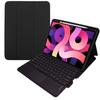
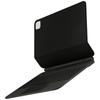
This keyboard, stand, and case all in one, offering versatile functionality. Compact yet highly functional, this case-integrated keyboard is designed specifically for the 11-inch iPad Air (M4/M3/M2) and iPad Air 10.9-inch (5th/4th generation).
Take it anywhere and work seamlessly on any task. Quickly pull out your iPad Air while on the go and smoothly perform a variety of tasks, including creating documents and materials, watching and editing videos, drawing illustrations, and reading.
Ergonomically designed keycaps that fit your fingertips. Each key has a curve that follows the natural shape of your fingertip, resulting in a comfortable typing experience and a design that reduces mistyping. By subtly changing the shape of the keys depending on their function and position, you can quickly operate them without looking at your hands.
A Japanese keyboard layout customized specifically for the iPad Air. With a large Enter key and JIS-compliant symbol key placement, you can easily transition from your usual keyboard without any issues.
Because it features a trackpad, key input and pointing operations can be completed right at your fingertips, significantly improving work efficiency.


 Vrácení peněz při nedoručení