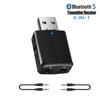
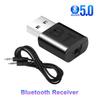
Specification:
Product Model: T7 Bluetooth Audio Receiver Transmitter Adapter
Interface: USB/aux
Whether plug and play: plug and play
External power supply: No external power supply
Transmission rate:10(Mbps)
Effective working radius:10(m)
Bluetooth standard:5.0
Operating frequency:2.4(MHz)
Product Color: Black
Product Size: 45*20*11mm
Product weight: 17g
Input voltage: DC5V
Features: Bluetooth hands-free call (four in one)
Suitable for: computer, TV, projector (transmitting mode)/speaker, headset, car (receiving mode)
Drive: no installation is required
Scope of use: This wireless adapter can be used for almost all Audio input /output digital products (3.5MM audio Interface), just connect the audio to the input /export.
Package includes:
1x Bluetooth 5.0 USB Wireless Adapter
1x 3.5mm Audio Cable
1x Instruction manual
How to use the launch function:
1. Plug the device into a USB port for power supply (such as a USB charging port on a TV, computer, or mobile phone charger), the device will automatically turn on, and the device will turn on the red indicator light and flash quickly, that is, enter the wireless search state
2. Insert the 3.5MM audio cable into the
3.5mm audio port of the device, and the other end of the audio cable into the audio output interface of the computer, TV, projector, mobile phone, tablet, MP3, CD player, and other devices (such as Headphone output interface of the device);
3. Turn on the wireless audio receiving device (such as wireless headphones, wireless speakers, etc.) to the pairing state, the device will automatically pair, the pairing is successful, and the red indicator light is always on;
4. If it is not the wireless device you want to connect, you can short-press the function key on the device, and it will automatically search for the next wireless audio-receiving device.
How to use the receiving function:
1. Plug the device into the USB port for the power supply (5V USB interface), and the device will automatically turn on, the device will light up the red indicator and flash quickly, press the function key frequently, and the indicator will switch to blue, and flash quickly, that is, wireless reception status;
2. Insert the 3.5MM audio cable into the
3.5mm audio port on the device, and the other end of the audio cable into the AUX port of the playback device (headphones, speakers, etc.)
3. Turn on the wireless function of the mobile phone (or computer), search the surrounding wireless devices, and find a device named Wireless Music Adapter in the search results. After finding and pairing with it, the indicator on the wireless receiver becomes a normal Bright state.


 No-delivery refund